The complete Formrava Renovation System

Keep the plan.
Control the detail.

When renovation quotes become commitments, keep the costs, purchases, decisions and changes in one Excel project workbook.

$59 USD · one-time purchase

Digital download through Payhip. Microsoft Excel access is separate. Review the total shown at checkout before paying.

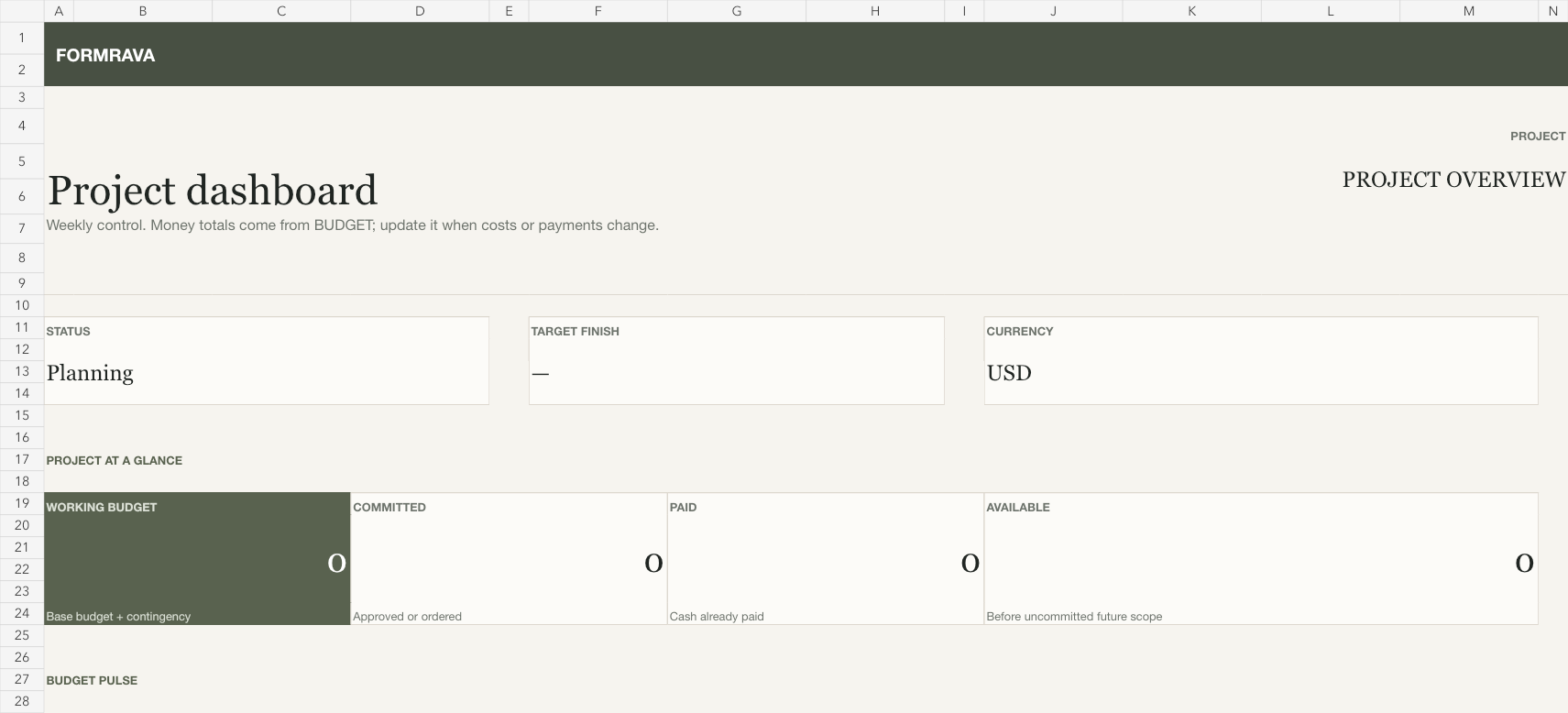
Actual Formrava Excel project dashboard showing the budget and project registers

Actual workbook view. Example figures are illustrative.

  • Eleven-sheet Excel project workbook
  • Five PDF guides for key project stages
  • Learning Kit with a worked kitchen example

Your download

A workbook to use.
Guidance to start.

Extract the ZIP package, keep the originals and create a working project copy. Start with the information you have and add detail as decisions are made.

01 / The project workbook

Detailed Excel records.

  • Setup and project dashboard
  • Planned, committed and paid budget records
  • Spaces, contractor records and purchases
  • Plan, decisions, changes and closeout

Eleven sheets in one workbook. You maintain the records; registers do not automatically update every related sheet.

02 / Five PDF guides

Practical checks.

  • Quick Start Guide
  • Pre-Renovation Checklist
  • Contractor Quote Checklist
  • Long-Lead Purchase Checklist
  • Final Walkthrough Checklist

03 / Learning Kit

See how the numbers work.

  • Getting-started guide
  • HTML introduction and reading notes
  • Separate two-sheet kitchen example
  • Fictional figures to explore before your own project

The example is separate from your main project workbook.

From approval to follow-up

Keep the money categories separate.

An approved cost and a payment answer different questions. Keep both visible as the project develops.

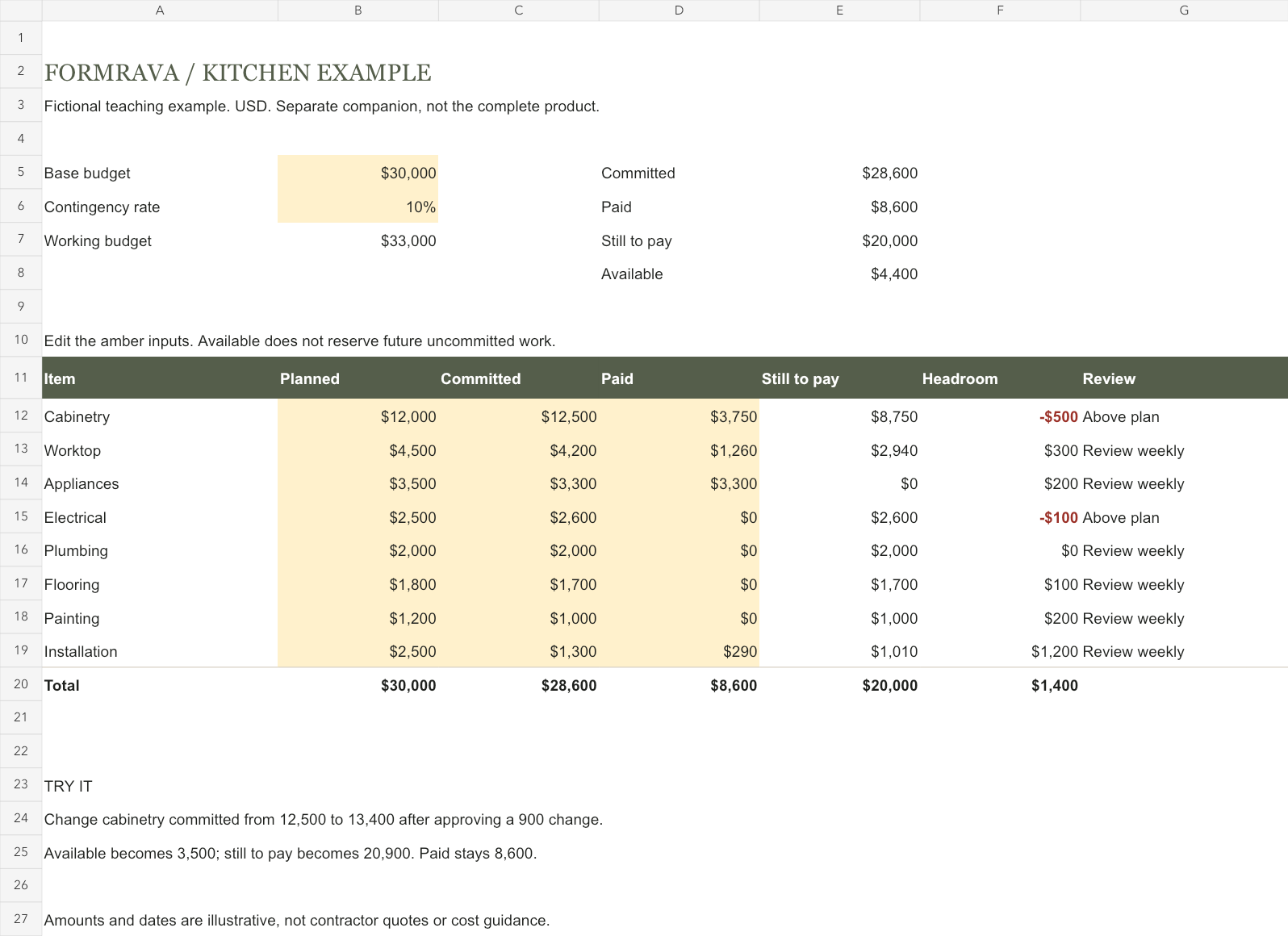
In the fictional kitchen example, a commitment of $12,500 and cumulative payments of $3,750 leave $8,750 still to pay. You keep the full commitment and record the deposit separately.

Illustrative arithmetic. Your project totals depend on the amounts you enter.

Formrava budget example showing planned, committed and paid renovation costs

Choose for your project

For the detail you are ready to manage.

Use the system when you want to maintain a structured project workbook and keep the records updated as work progresses.

A useful fit when…

  • You are organising your own home renovation.
  • You have quotes, approved costs, orders or decisions to track.
  • You have access to Microsoft Excel and want editable project records.
  • You are prepared to update figures and review the project regularly.

Start with the free tools when…

  • You are still describing the work or gathering quote questions.
  • You need a first budget view before committing to a larger toolkit.
  • You want to try Formrava’s way of organising a project first.

Before you buy

Know what to expect.

What happens after purchase?

Use the Payhip download link to download the ZIP. Extract it before opening the workbook and guides. Keep the original files, then save a working project copy. The included introduction explains where to start.

Is this a subscription or an app account?

The complete system is a $59 USD one-time digital download. There is no subscription or app account included. The free web workspace remains available separately.

Do I need Microsoft Excel?

Yes, the downloadable workbook is designed for Microsoft Excel. Excel access is not included. Apple Numbers compatibility is not verified. If you want to plan without Excel, use the free browser workspace.

Does the web workspace transfer my entries to Excel?

No automatic sync. Use workspace exports as references and enter the relevant information into your own workbook. The CSV exports do not automatically update or map to the workbook’s registers.

Does everything update automatically?

The workbook calculates within its supported ranges. You enter and maintain the records. Entries in purchases, changes and other registers do not automatically update BUDGET; update affected records yourself after checking the written agreement. Read the included Quick Start Guide before extending input ranges.

Can it verify contractors or manage the work for me?

Formrava helps you organise your project records. It does not verify contractors, approve building work, contact trades or replace project-specific professional advice.

I already bought Formrava. Do I need to buy again?

Use your original Payhip download link to access your purchased files. There is no need to buy the same product again to use the free workspace or public guides.

Renovation, under control.

Give the project detail a place.

The complete Excel workbook, five PDF guides and Learning Kit. $59 USD, one time.

Microsoft Excel access is separate. Digital delivery through Payhip. Check the order total and purchase terms at checkout.

Before the commitment

Still working through a quote?

Use the free review to turn unclear scope, allowances, payments and dates into a conversation sheet. Then see how an approved cost and a deposit become separate records in the system.

A question before buying?

Find out whether it fits.

If something about the files or workflow is unclear, ask before you decide.

Ask Formrava a question →